

You are using an out of date browser. It may not display this or other websites correctly.
You should upgrade or use an alternative browser.
You should upgrade or use an alternative browser.
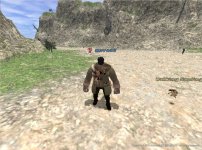
Graphics problem...
- Thread starter cokenn
- Start date


did i miss a thread? lol

did i miss a thread? lol
Kind of, I have the same exact problem its been voiced before out of pure spewing rage
Spoiler:

If your playing on vista/laptop/something with the wrong chipset it'll do that, My laptop met all the requirements for ffxi, but the chipset was some shitty one that ended up not being able to run the graphics. :awesome: Power to you fellow melted lego player!
VIIIISTAAA, LAAAPPPTOP... 2/3! damnit... good thing i have a desktop too. So there's no way to fix this?
VIIIISTAAA, LAAAPPPTOP... 2/3! damnit... good thing i have a desktop too. So there's no way to fix this?
For the laptop? New motherboard
kk, just gonna play on my desktop...


- Joined
- Apr 11, 2008
- Messages
- 578
- Location
- Salaberry-de-Valleyfield, Québec
- Website
- www.socadis.com
- Nation Banner

- Main Job

- Secondary Job

- Third Job

- Server
- Quetzalcoatl
- Linkshell
- Reliance
- FFXI
- Tribalinius
- FFXIV
- Tribalinius Liberius
There is probably a hotfix available somewhere. Usually updating the drivers or a few google searches do the trick. I personally use custom drivers when it comes to my own laptops either because the company who distributes the laptop (i.e.: Dell, Compaq, HP, etc.) makes shitty version of it or they don't update them on a regular basis.
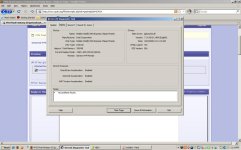
Considering the PC port of FFXI being atrocious as it is I wouldn't be surprised if someone have found a fix to a similar problem though. It wouldn't hurt if we could see the actual infos of your video card and maybe find some clues on how to fix your problem.
If you can, go to Start > Run > type in the box "dxdiag" (without the quotes of course) then press enter.
Go to display and make us a nice screenshot of the infos there and post it here .
.
I included mine to let you know how it's supposed to look.

Considering the PC port of FFXI being atrocious as it is I wouldn't be surprised if someone have found a fix to a similar problem though. It wouldn't hurt if we could see the actual infos of your video card and maybe find some clues on how to fix your problem.
If you can, go to Start > Run > type in the box "dxdiag" (without the quotes of course) then press enter.
Go to display and make us a nice screenshot of the infos there and post it here
.I included mine to let you know how it's supposed to look.
- Joined
- Apr 11, 2008
- Messages
- 578
- Location
- Salaberry-de-Valleyfield, Québec
- Website
- www.socadis.com
- Nation Banner
- Main Job
- Secondary Job
- Third Job
- Server
- Quetzalcoatl
- Linkshell
- Reliance
- FFXI
- Tribalinius
- FFXIV
- Tribalinius Liberius
http://www.intel.com/support/graphics/intelgm965/sb/CS-029330.htm
There we go, apparently Intel is aware of the trouble lol. Follow the instruction given by the manufacturer and you should be ok ^^.
There we go, apparently Intel is aware of the trouble lol. Follow the instruction given by the manufacturer and you should be ok ^^.
Awesome! thanks a lot for your help and info, much appreciated!
- Joined
- Apr 11, 2008
- Messages
- 578
- Location
- Salaberry-de-Valleyfield, Québec
- Website
- www.socadis.com
- Nation Banner
- Main Job
- Secondary Job
- Third Job
- Server
- Quetzalcoatl
- Linkshell
- Reliance
- FFXI
- Tribalinius
- FFXIV
- Tribalinius Liberius
No problem, enjoy your playtime! 


- Joined
- Jul 29, 2004
- Messages
- 2,399
- Location
- wisconsin
- Main Job
- Secondary Job

- Third Job

- FFXIV
- masterorion
on my vista intel chipset laptop. updating drivers didnt fix my problem. i had to roll them back to original drivers to resolve the same issue.
did this on both mine and my brother's laptop, worked both times.

- Joined
- Oct 16, 2004
- Messages
- 1,325
- Location
- Adana, Turkey
- Main Job

- Secondary Job

- Third Job

- Server
- Quetzalcoatl
- Linkshell
- WallofAegis
- FFXIV
- Gregedor
on my vista intel chipset laptop. updating drivers didnt fix my problem. i had to roll them back to original drivers to resolve the same issue.
It's similar on my laptop with a nVidia chipset. One driver update will fail (like my current drivers...) and then the next update it works again, or rolling back it works again.
Someone brought it up earlier, it's because essentially 0 laptop chips are on the "approved list" from SE so they don't behave exactly like SE demands them too.
http://www.playonline.com/ff11us/envi/win/win01.html?pageID=win
It is entirely frustrating though as I have played a lot of games...like A LOT of games over the last 20+ years and due to the beauty of developing a common interface (aka DirectX or OpenGL) your programs don't break with a driver update. The driver interfaces your card to DirectX and then the games all just call DirectX routines. FFXI is the first and only game I've had that's broken routinely like this.
Personally I wish SE secretly had a PC version overhaul in the works that addresses the speed, lag and reliability problems. They did make an attempt a windowed FFXI so anything is possible!
Also.... WELCOME BACK SEV!
Edit: As an update I rolled back my video driver and there are still graphics issues. Since a FFXI update happend at the same time I did my driver update I think now that it's the actual FFXI update that broke my graphics. So... putting my newer driver back on and dealing with it. /cry
Last edited: